
Introduction
CI/CD stands for Continuous Integration and Continuous Delivery/Deployment. It is a modern software development practice that automates the process of integrating code changes from multiple developers into a single codebase and delivering software quickly and reliably.
Developers frequently commit their work to repositories like GitHub, GitLab, or Bitbucket, and automated pipelines take care of building, testing, and deploying the application.
Before CI/CD
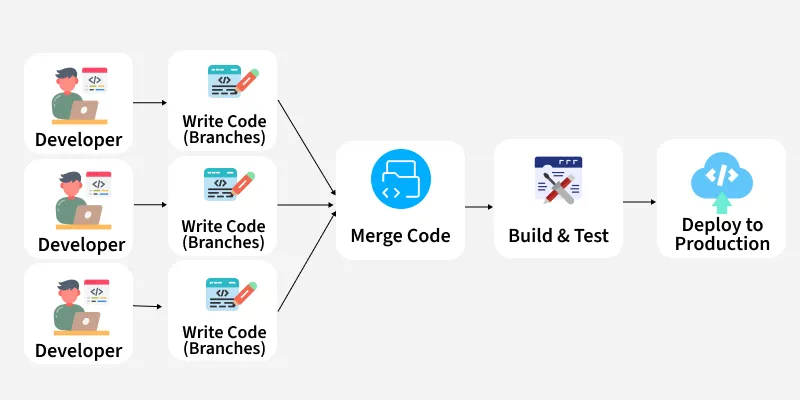
In the past, software development involved:
- Long-lived feature branches that existed for weeks or months
- Painful merge conflicts when integrating code
- Manual, late-stage testing, causing bugs to appear late and cost more to fix
- Slow, risky deployments that could take days or weeks
- Siloed teams — developers coded, testers tested, operations deployed
This resulted in slow delivery and unreliable software releases.
After CI/CD
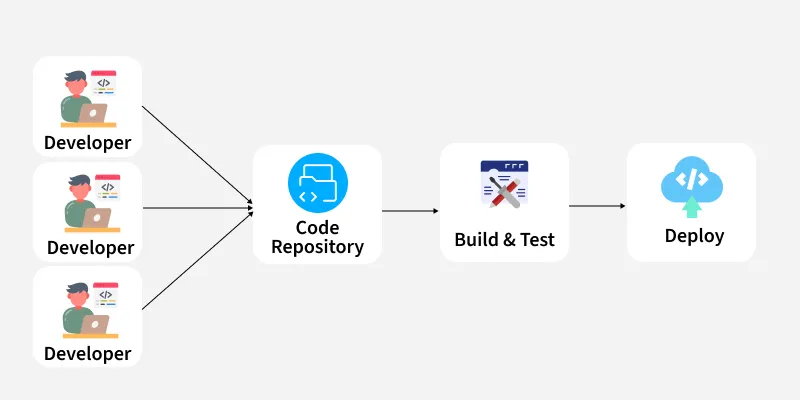
CI/CD transformed the entire development workflow:
- Developers commit code frequently to a shared branch
- Automated pipelines instantly run tests, builds, and code checks
- Bugs are detected early and fixed faster
- Continuous Delivery prepares packaged builds ready for deployment
- Continuous Deployment automatically releases every successful change
- Updates become smaller, more frequent, and less risky
- Tools like Git, Jenkins, Docker, Kubernetes help automate building through deployment
Software delivery now happens in hours instead of days.
Continuous Integration (CI)
Continuous Integration involves:
- Frequently committing code to a shared repository
- Automatically building and testing after each commit
- Getting quick feedback when something breaks
Studies show CI can save developers 25–30% of their time.
Continuous Delivery (CD)
Continuous Delivery ensures:
- Software is automatically tested
- Code is packaged and always ready for deployment
- Deployment to production is triggered manually
If production deployment is automated, it becomes Continuous Deployment.
CI Workflow
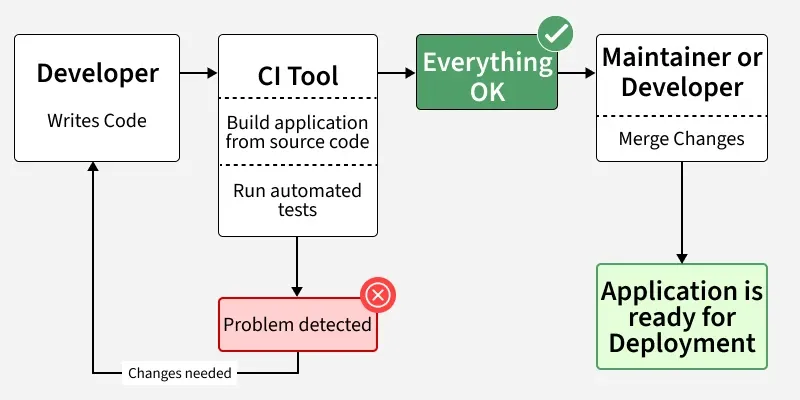
When a developer commits code:
- CI pipeline is triggered
- Code is built
- Automated tests run
- Results are sent to developers
This ensures fast bug detection and reduces manual effort.
CI/CD Workflow
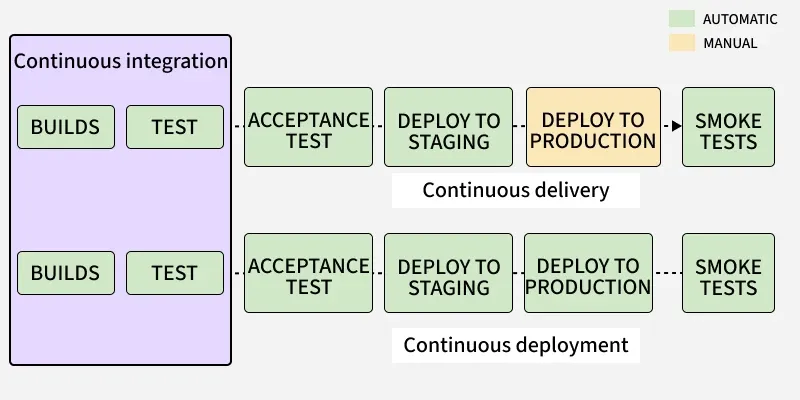
After continuous integration:
- Code is deployed to a staging environment
- Additional automated tests run (Acceptance, Regression)
- After successful tests:
- Continuous Delivery → Manual production deployment
- Continuous Deployment → Automated production release
Common CI/CD Tools
Popular Tools
| Tool | Description |
|---|---|
| Jenkins | Most widely used CI/CD tool |
| Concourse | Automation for CI/CD mechanics |
| GoCD | Pipeline modeling and visualization |
| Screwdriver | Continuous delivery platform |
| Spinnaker | Multi-cloud deployment platform |
Jenkins Workflow in CI/CD
- Developer commits code
- Jenkins detects changes via webhook or polling
- Jenkins builds using Maven, Gradle, or Docker
- Automated tests run
- Deployment to staging/production
- Notifications sent via email, Slack, etc.
What is a CI/CD Pipeline?
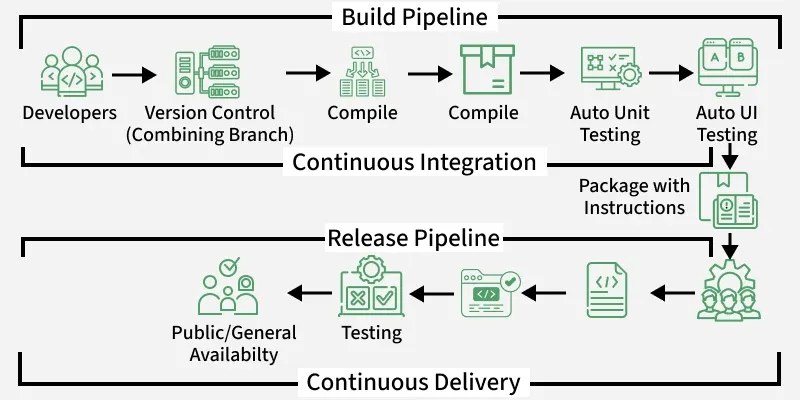
Many confuse CI/CD with the CI/CD Pipeline, but they differ:
- CI/CD is a practice and workflow
- CI/CD Pipeline is the automated sequence of steps that takes code from development to production
A CI/CD pipeline is a series of automated steps that build, test, and deploy software efficiently and safely.
Components of a CI/CD Pipeline
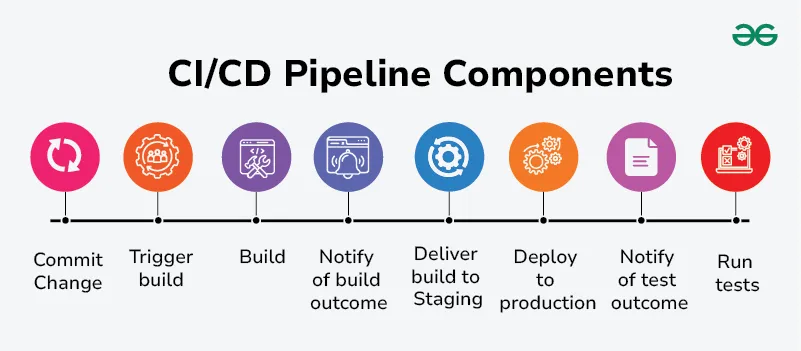
1. Commit Change
Developers make code changes and commit these changes to a version control system (e.g., Git). This step initiates the CI/CD pipeline. Committing code changes ensures that they are tracked and versioned properly.
2. Trigger Build
The version control system detects the new commit and triggers the build process automatically. Automated triggering of the build process ensures that new changes are continuously integrated and tested.
3. Build
The codebase is compiled and built into a deployable artifact, such as a binary executable or a Docker image. Common tools include Maven, Gradle, Ant for Java projects, and Docker for containerized applications. The build step verifies that the code compiles correctly and that all dependencies are resolved.
4. Notify Build Outcome
The CI/CD system notifies the team of the build results, whether it passed or failed. Immediate feedback on the build status helps developers quickly identify and resolve any build issues. Notification systems can include emails, chat integrations (like Slack or Microsoft Teams), or dashboards in tools like Jenkins or GitLab CI.
5. Run Tests
Automated tests are executed on the build artifact. These can include unit tests, integration tests, end-to-end tests, and more. Testing frameworks like JUnit, Selenium, TestNG, pytest, etc. Running tests ensures that the new code does not introduce any bugs or regressions and that it meets the required quality standards.
Automated tests ensure quality:
- Unit tests
- Integration tests
- End-to-end tests
6. Notify Test Outcome
The results of the test suite are reported back to the development team. Quick feedback on test outcomes allows developers to address any failures promptly. Similar to build notifications, results can be sent via email, chat, or dashboards.
7. Deliver Build to Staging
If tests pass, the build artifact is deployed to a staging environment. The staging environment simulates the production environment, allowing for final validation before production deployment. Deployment tools like Ansible, Chef, Puppet, Kubernetes, or cloud-specific services like AWS CodeDeploy.
8. Deploy to Production
After successful validation in staging, the build is automatically or manually promoted to the production environment. This step makes the new features and fixes available to end-users. Deployment strategies might include blue-green deployment, canary releases, or rolling updates to minimize downtime and risk.
Production release happens:
- Manually → Continuous Delivery
- Automatically → Continuous Deployment
CI/CD Security
CI/CD security is all about protecting software development pipelines from hackers, data leaks, and security flaws. By adding security checks at every stage of development, teams can catch problems early and prevent attacks.
Common Security Risks
| Risk Area | Description |
|---|---|
| Code & Dependencies | Outdated or unsafe libraries can introduce vulnerabilities |
| Pipeline Access | Weak passwords or excessive access can let attackers in |
| Container Security | Running unverified images may lead to security breaches |
| Infrastructure | Misconfigured cloud settings can expose data |
Security checks must be integrated into every stage of CI/CD.
Summary
CI/CD automates the software lifecycle — from code integration to deployment — enabling teams to deliver high-quality software faster, safer, and more efficiently.
Have questions about implementing CI/CD in your workflow? Share in the comments below!